Folder Rewind
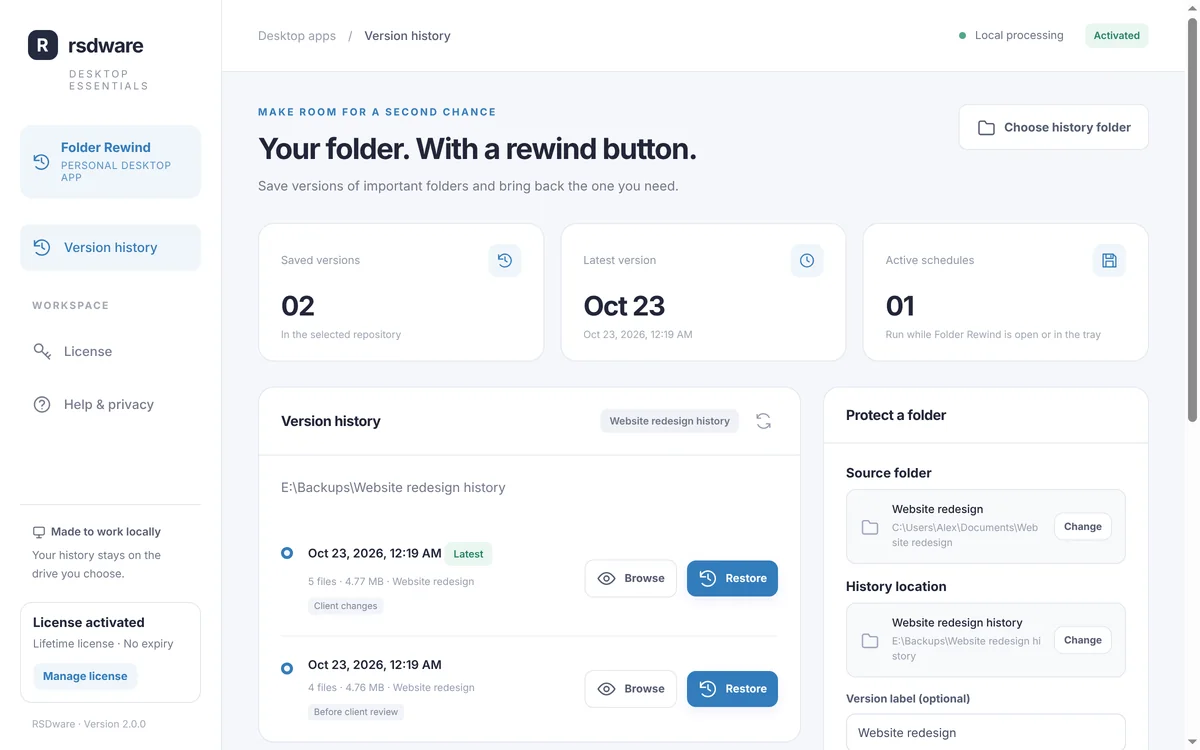
Your folder. With a rewind button. Folder Rewind saves versions of the folders that matter to you and brings back any earlier version as a new copy, without touching what you have now. Files that didn’t change are stored once, and schedules save versions by themselves while the app runs.
Download free for WindowsBuy license key · US$9.99
Free download. License key US$9.99 one time · lifetime license for one PC. Windows 10 and 11, 64-bit.
Get Folder Rewind
Free to download. A lifetime license key (US$9.99, one PC) unlocks it.
Latest version
- Price
- Free download. License key US$9.99 one time: lifetime license for one PC. No subscription.
- System requirements
- Windows 10 or 11, 64-bit.
- Updates
- Checks for a new version when it opens and every few hours. New versions are required: it installs the update and reopens.
- Only download from here
- The Download button always gives you the newest version from our update server.
What it does
- Save a versionChoose a folder and where its history goes, then save a version with one click. Files that didn’t change are stored only once.
- Bring it backBrowse what any version contained and restore all of it, or one file, into a new folder. Every file is checked before it’s restored.
- On a scheduleSave a version every 15 minutes, hour, 4 hours or day while Folder Rewind runs, also from the system tray.
- Storage you controlKeep the latest versions you choose and set a storage budget. The newest version is always kept.
- Your files stay yoursEverything happens on your PC. Files and folder names are never sent anywhere.
- Always up to dateFolder Rewind checks for a new version when it opens and every few hours. New versions are required: it installs the update and reopens.
How it works
- 1. Download and installThe download is free. Run the setup file; Windows may show “Windows protected your PC” because the app is new: choose More info, then Run anyway.
- 2. Get a license keyBuy it here for US$9.99 (one time), now or later: the app also offers it when it opens. The key appears right after paying and is emailed to you.
- 3. ActivateIn Folder Rewind, open License, paste the key and click Activate. One key works on one PC; “Deactivate this PC” moves it to another.
- 4. Save a versionChoose the folder to protect and an empty history folder, ideally on another drive, then click Save a version now. Turn on a schedule if you like.
- 5. RestorePick a version, choose Browse to see its files or Restore to put a verified copy in a new folder. Your current files stay as they are.
Questions about Folder Rewind
Where should the history go?
On a different physical drive, such as an external drive. A history folder on the same drive can’t protect you if that drive fails.
Is the history encrypted?
No. History folders contain readable copies of your files, so keep them somewhere only the right people can open.
Do schedules run when the app is closed?
Schedules run while Folder Rewind is open or in the system tray. Turn on Start with Windows to keep them going after a restart.
Can I restore without a license?
Yes. Browsing and restoring always work, with or without an active key. A key is needed to save new versions and turn on schedules.
Can I use the key on another PC?
One key works on one PC at a time. In the app, open License and choose Deactivate this PC, then activate the key on the new PC.
Can I get a refund?
License keys are not refundable, except where the law requires it or for an accidental duplicate charge. Download and look around first: the app is free to install.
How do I uninstall it?
Use Settings › Apps › Installed apps in Windows, like any other program. Your history folders and settings are kept.