R Folder Locker
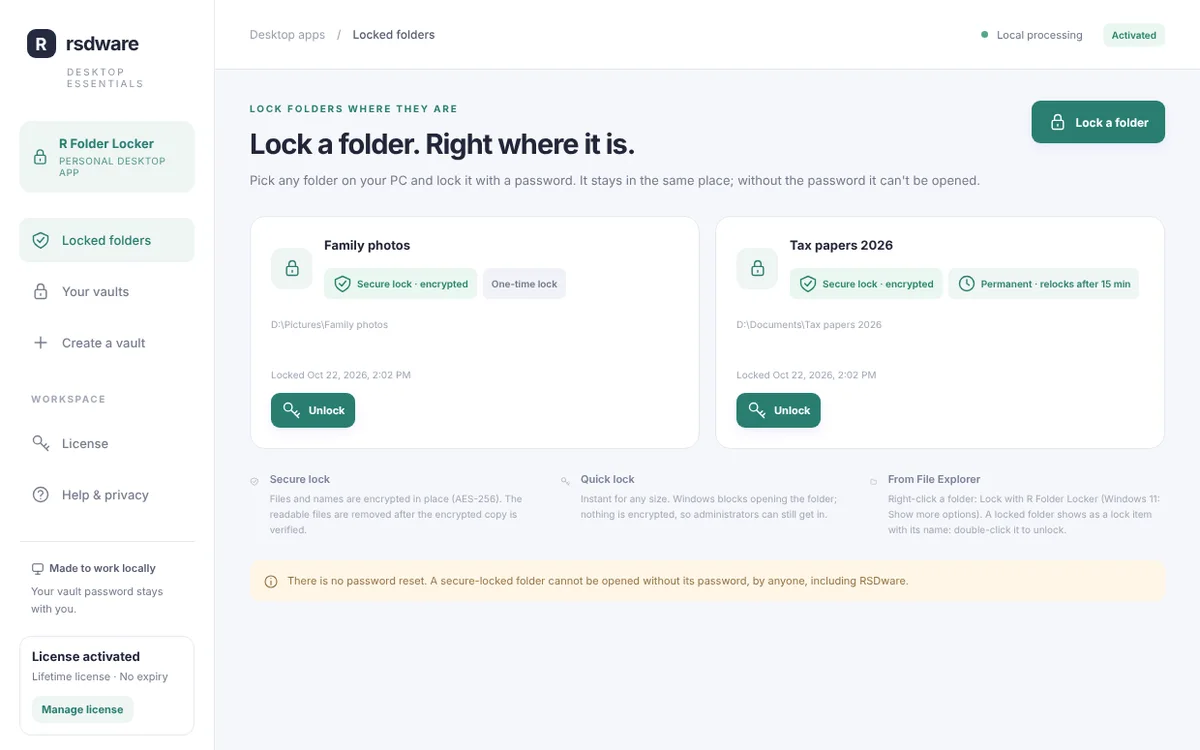
Lock any folder. Right where it is. R Folder Locker locks folders on your Windows PC right where they are. A locked folder becomes a lock item with the same name: double-click it and enter your password to open it. Permanent locks lock themselves again 15 minutes after you open them.
Download free for WindowsBuy license key · US$49.99
Free download. License key US$49.99 one time · lifetime license for one PC. Windows 10 and 11, 64-bit.
Get R Folder Locker
Free to download. A lifetime license key (US$49.99, one PC) unlocks it.
Latest version
- Price
- Free download. License key US$49.99 one time: lifetime license for one PC. No subscription.
- System requirements
- Windows 10 or 11, 64-bit.
- Updates
- Checks for a new version every time it opens. New versions are required: it installs the update and reopens.
- Only download from here
- The Download button always gives you the newest version from our update server.
What it does
- Lock where it isRight-click any folder and choose Lock with R Folder Locker. It stays in the same place; without the password it can’t be opened.
- Secure or quickSecure lock encrypts every file and file name with AES-256. Quick lock blocks the folder instantly, for any size.
- Permanent or one-timeA permanent lock locks itself again 15 minutes after you open it. A one-time lock stays open once you unlock it.
- Asks before it locks againA minute before a permanent lock locks again, you get a reminder. Lock now, add 15 minutes, or keep it unlocked.
- Your files stay yoursEverything happens on your PC. Files, folder names and passwords are never sent anywhere. There is no password reset, by anyone, including us.
- Always up to dateR Folder Locker checks for a new version every time it opens. New versions are required: it shows the update, installs it and reopens.
How it works
- 1. Download and installThe download is free. Run the setup file; Windows may show “Windows protected your PC” because the app is new: choose More info, then Run anyway.
- 2. Get a license keyBuy it here for US$49.99 (one time), now or later: the app also offers it when it opens. The key appears right after paying and is emailed to you.
- 3. ActivateIn R Folder Locker, open License, paste the key and click Activate. One key works on one PC; “Deactivate this PC” moves it to another.
- 4. Lock foldersRight-click a folder > Lock with R Folder Locker (on Windows 11: Show more options first), choose Secure or Quick and Permanent or One-time, and set a password.
- 5. UnlockA locked folder shows as a lock item with the folder’s name. Double-click it and enter the password. A permanent lock locks itself again 15 minutes later.
Questions about R Folder Locker
What is the difference between Secure and Quick lock?
Secure lock encrypts every file and file name in the folder (AES-256); without the password nobody can read them, even on another PC. Quick lock is instant for any size: Windows blocks opening the folder, but nothing is encrypted, so someone with administrator rights could still get in.
What is a permanent lock?
After you unlock a permanent folder it locks itself again 15 minutes later (you get a reminder a minute before, and can add time or keep it open). A one-time lock stays unlocked once you unlock it.
What if I forget the password?
There is no reset. A secure-locked folder can’t be opened without its password, by anyone, including RSDWare. Keep your password somewhere safe.
Can I use the key on another PC?
One key works on one PC at a time. In the app, open License and choose Deactivate this PC, then activate the key on the new PC.
Can I get a refund?
License keys are not refundable, except where the law requires it or for an accidental duplicate charge. Download and look around first: the app is free to install.
How do I uninstall it?
Unlock your folders first, then use Settings › Apps › Installed apps in Windows. Uninstalling keeps folders locked: install it again to unlock them.