R Notes
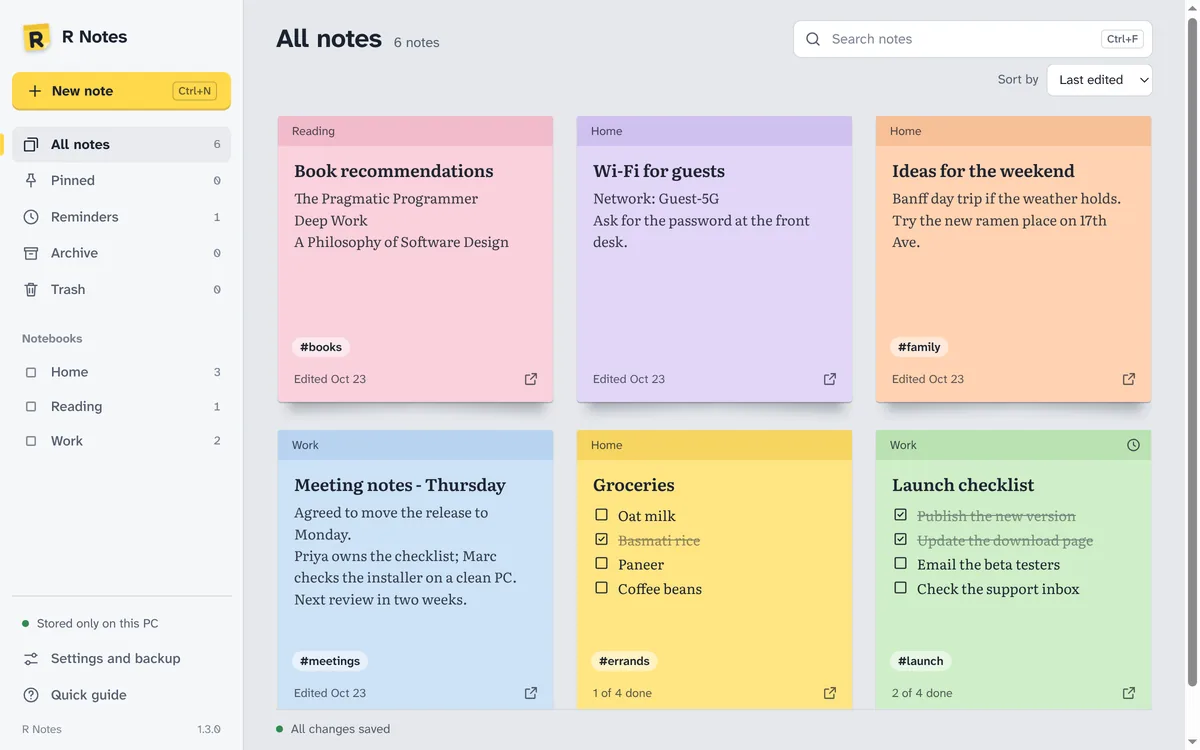
Notes on your desktop. Private by default. R Notes (formerly Fast Notes) keeps text notes and checklists on your PC, with sticky notes on the desktop, reminders, notebooks, tags and search. Notes save as you type and stay on your computer, with backups you control.
Free. Windows 10 and 11, 64-bit.
Get R Notes
Free for Windows 10 and 11. No account needed.
Version 1.3.0 · 102 MB · Released October 23, 2026
- Price
- Free. No trial, no account, nothing to buy.
- System requirements
- Windows 10 or 11, 64-bit.
- Updates
- Checks for a new version when it opens and every few hours. New versions are required: it installs the update and reopens.
- Only download from here
- The Download button always gives you the newest version from our update server.
What it does
- Sticky notes on the desktopPut any note on the desktop, pin it above other windows, change its colour and opacity. Notes come back where you left them.
- Checklists and remindersTurn a note into a checklist, and set a reminder that pops up when it’s due.
- Find anythingNotebooks, tags, archive and trash, and search across titles, text and checklist items.
- BackupsBack up all your notes to one file and restore them on this PC or another one.
- Stays on your PCNo account and no cloud: notes are saved on your computer.
- Always up to dateR Notes checks for a new version when it opens and every few hours. New versions are required: it installs the update and reopens.
How it works
- 1. Download and installFree, no account. Run the setup file; Windows may show “Windows protected your PC” because the app is new: choose More info, then Run anyway.
- 2. Write a noteChoose New note (Ctrl+N), give it a title and type. It saves as you go.
- 3. Put it on the desktopChoose On desktop: the note becomes a sticky window you can move, resize and pin on top.
- 4. Stay organisedAdd notebooks, tags, checklists and reminders; archive what you’re done with.
Questions about R Notes
Is it really free?
Yes. There is no trial, no account and nothing to buy.
Where are my notes saved?
On your PC, in your Windows user’s app-data folder. Use Back up all notes to keep a copy elsewhere.
Can I use my notes on another PC?
There is no cloud sync. Back up your notes to a file and restore it on the other PC.
Do reminders work when R Notes is closed?
Reminders need R Notes running, for example in the system tray. Turn on Start with Windows to keep it there.
How do I uninstall it?
Use Settings › Apps › Installed apps in Windows, like any other program. Your notes and settings are kept.