R Pinger
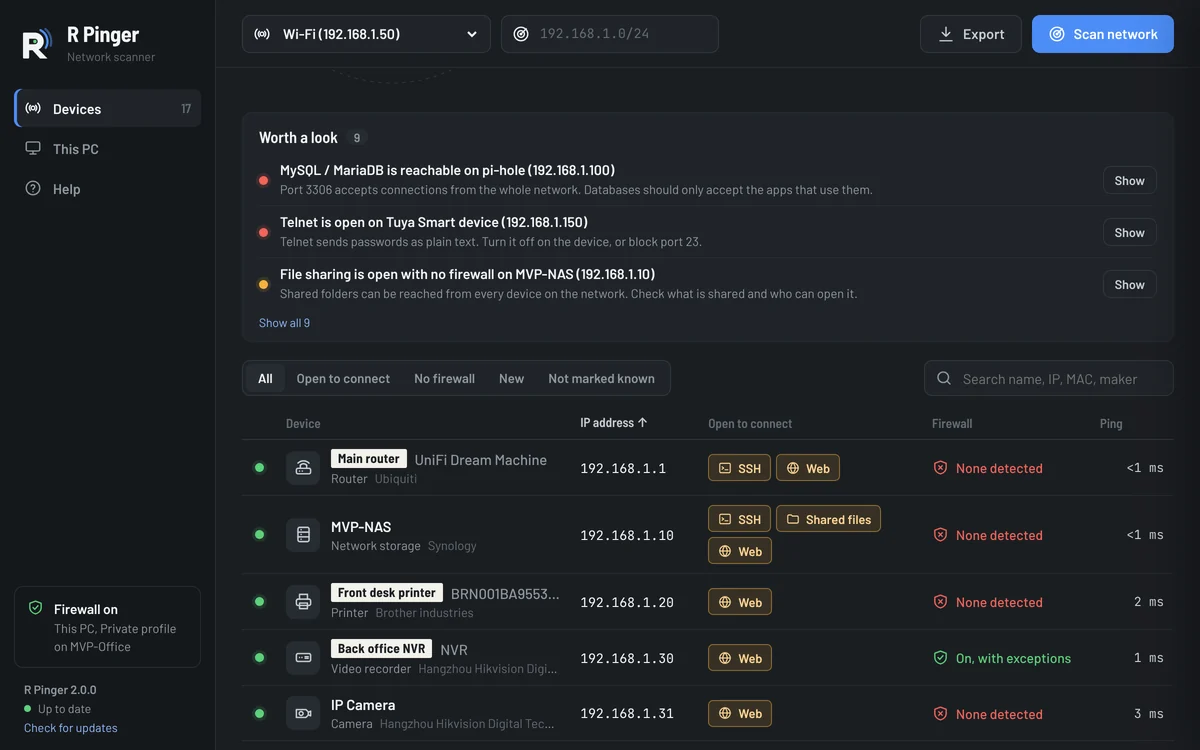
Every device on your network, at a glance. R Pinger scans your local network and lists every device on it: its name, IP and MAC address, maker, what you can connect to (web page, Remote Desktop, shared files, SSH) and whether a firewall protects it. Like arp -a, but it also finds devices that block ping and points out what is worth a look.
Free. Windows 10 and 11, 64-bit.
Get R Pinger
Free for Windows 10 and 11. No account needed.
Latest version
- Price
- Free. No trial, no account, nothing to buy.
- System requirements
- Windows 10 or 11, 64-bit.
- Updates
- Checks for a new version when it opens and every few hours. New versions are required: it installs the update and reopens.
- Only download from here
- The Download button always gives you the newest version from our update server.
What it does
- Finds everythingPings every address and reads the ARP table, so devices that ignore ping still show up. Names come from Windows, Bonjour, DNS, UPnP and the device’s own web page.
- Open to connectChecks common ports on every device and opens a web page, Remote Desktop, shared folders or SSH in one click.
- Firewall at a glanceShows whether each device filters connections, and whether Windows Firewall is on for this PC.
- Worth a lookAfter each scan it lists Telnet, open databases, Remote Desktop or file sharing without a firewall, cameras with an open web page and new devices.
- Labels and notesName devices, add notes and mark the ones you know. New devices and changed addresses are flagged next time.
- Always up to dateR Pinger checks for a new version when it opens and every few hours. New versions are required: Update now installs it and reopens R Pinger.
How it works
- 1. Download and installFree, no account. Run the setup file; Windows may show “Windows protected your PC” because the app is new: choose More info, then Run anyway.
- 2. Scan your networkPick your Wi-Fi or Ethernet adapter and choose Scan network. A home or office network takes about 20 seconds.
- 3. Check what it foundOpen any device for its names, open ports and firewall verdict, connect to it, or label it.
Questions about R Pinger
Is it really free?
Yes. There is no trial, no account with us and nothing to buy.
Which networks can it scan?
Your own: the networks your PC is connected to and private address ranges (10.x, 172.16–31.x, 192.168.x). It doesn’t scan the internet.
Does it need administrator rights?
No. The first time, Windows may ask whether R Pinger can use the network: allow it on private networks so device names can come back.
Does it send my scan anywhere?
No. Scans, labels and notes stay on your PC. R Pinger only asks us which version is the newest.
How do I uninstall it?
Use Settings › Apps › Installed apps in Windows, like any other program. Your labels, notes, last scan and settings are kept.