TaskPilot
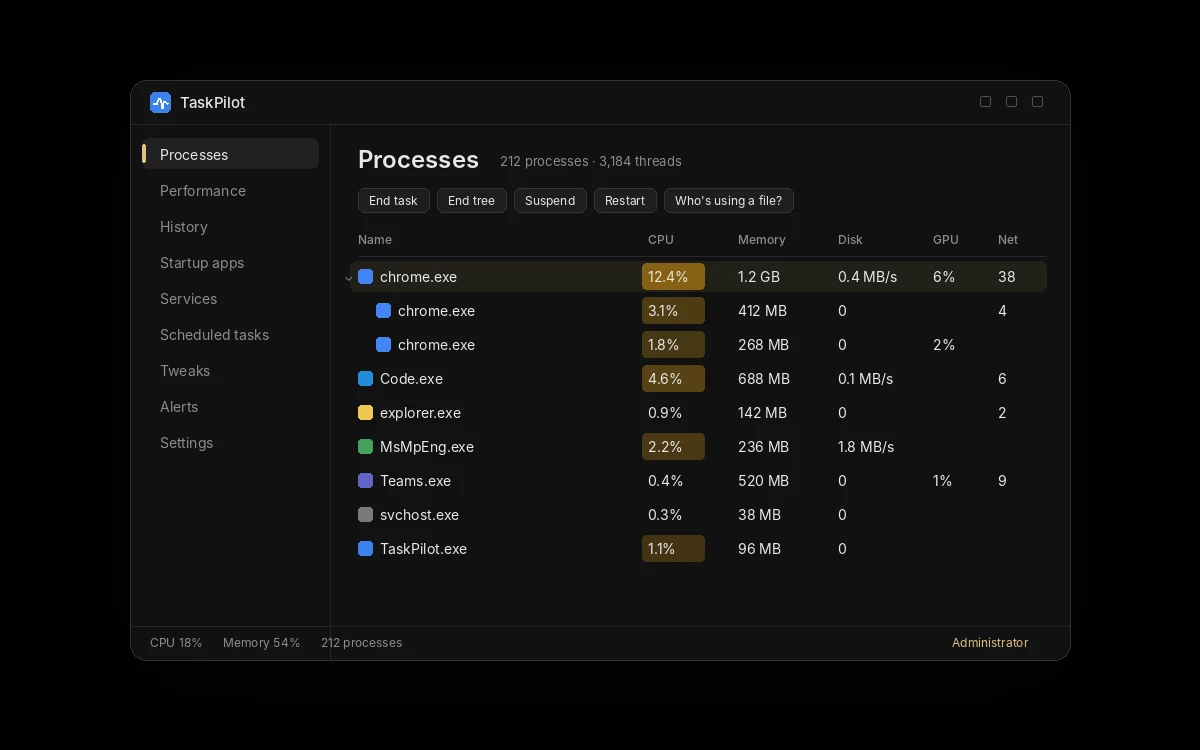
See everything your PC is doing. Fix it in one click. TaskPilot is a free task manager for Windows 10 and 11 that goes further than the one built in: a real process tree, history of what slowed your PC down, alerts, and one-click fixes.
Free. Windows 10 and 11, 64-bit.
Get TaskPilot
Free for Windows 10 and 11. No account needed.
Latest version
- Price
- Free. No trial, no account, nothing to buy.
- System requirements
- Windows 10 (version 1809 or later) or Windows 11, 64-bit. Administrator rights to install.
- Updates
- TaskPilot checks for a new version every time it opens. New versions are required: when one is out, TaskPilot installs it by itself as soon as you open it, then reopens.
- Only download from here
- The Download button always gives you the newest version from our update server.
What it does
- The whole pictureA real process tree with CPU, memory, disk, GPU and network for every process, plus 7 days of history showing what was busiest each minute.
- More controlSuspend, restart or end a whole process tree, set a priority that sticks, and find out which program is locking a file.
- One-click fixesRestart Explorer, audio or the network, reboot into BIOS or Safe Mode, clear temp files and manage startup apps and services.
- Who’s using this file?Find the program that locks a file you can’t delete or move, and close it.
- Alerts that actFor example: when a browser uses over 4 GB for 30 seconds, lower its priority, suspend it or notify you.
- Free, for goodNo trial, no account and nothing to buy.
How it works
- 1. Download and installRun the setup file. Windows asks for administrator permission because a task manager needs it to manage services and other programs. If Windows SmartScreen shows “Windows protected your PC”, choose More info, then Run anyway.
- 2. See what’s runningEvery process appears in a tree, with CPU, memory, disk, GPU and network.
- 3. Find what slowed you downHistory keeps every minute of the last 7 days, including which process was the busiest.
- 4. Fix itSuspend, restart or end a process tree, or use a one-click fix.
Questions about TaskPilot
Is TaskPilot really free?
Yes. There is no trial, no account and nothing to buy.
Why did it update by itself?
Every new version is required, so everyone runs the newest, safest version. When TaskPilot opens and a new version is out, it downloads it, installs it and reopens by itself. If Windows asks for permission, choose Yes.
Can it replace Windows Task Manager?
Yes, optionally. In TaskPilot’s Settings you can make Ctrl+Shift+Esc open TaskPilot. Turning it off, or uninstalling TaskPilot, brings Windows Task Manager back.
How do I uninstall it?
Use Settings › Apps › Installed apps in Windows, like any other program.